Coming soon · macOS

Your cases.
Your data.
Your machine.

A local-first legal workspace with CAP'N — your AI captain. Documents stay on your device. CAP'N drafts motions, tracks deadlines, and handles the busywork inside the matter boundary — so you focus on what matters.

Form blocked at your firm? Email [email protected].

Local-first
End-to-end encrypted
CAP'N on autopilot
Trust by architecture
See it in 20 seconds

What if the day started differently?

From buried to briefed. CAP'N helps you stay on top of your practice.

★ Runs your whole practice

Everything your firm runs on, in one local app.

A complete practice-management system that keeps your data on your machine, with CAP'N onboard.

Matters & cases

Intake to closeout: notes, documents, deadlines, and contacts, all linked to the matter.

Tasks & workflows

Assign, prioritize, and track every to-do. CAP’N surfaces what’s due before it slips.

Calendar & court-rule deadlines

FRCP & local-rule deadline math done for you. Every date carries its matter.

Drafting with Draft Pilot

Prepare and finalize motions, briefs, and letters from your templates and real matter facts. Never a blank page.

Documents & search

PDFs, Word docs, and scans, all searchable. Find the right paragraph in seconds.

Communications

Secure client messaging, email, text, and e-signature. Every thread logged to the matter.

CAP’N , your AI workspace

Ask CAP’N about any matter, or let the action center tee up the busywork. You approve every step.

Prepare & review discovery

Build your requests and responses, then review the production. Tag documents and flag privilege, all in CasePilot.

Time & billing

Capture time as you work and generate clean invoices.

Reports & insights

Hours, revenue, deadlines, and caseload at a glance, across the whole practice.

Leads, intake & contacts

Capture a lead, take intake notes, convert to a matter. Every party tracked with its role.

Court forms & exhibits

Fill court PDF forms and prep exhibits without leaving CasePilot.

★ The CasePilot Way

Most legal tech makes you choose between convenient and private.
We refuse.

Four product decisions that let CAP'N handle the busywork without trading away where your client files live or who gets to see them.

01

Local-first by design

Case work runs where the lawyer works: on the attorney's machine, not in a remote processing environment. Fast, always. Offline-capable, by default.

02

CAP'N stays in the matter

Your AI captain is confined to the matter, workspace, and permissions it's been granted. It drafts, schedules, and searches inside the boundary. Never a general assistant floating above the firm.

03

CAP'N takes action

Other platforms hand you a suggestion. CAP'N drafts the filing, adds the calendar event, opens the time entry, and surfaces it for your review. A finished step, not a to-do list.

04

Trust by architecture

Privacy isn't a policy promise. It's where computation happens, how CAP'N's permissions work, and what the cloud is allowed to do. Convenient because it's bounded, not in spite of it.

✦ Meet CAP'N

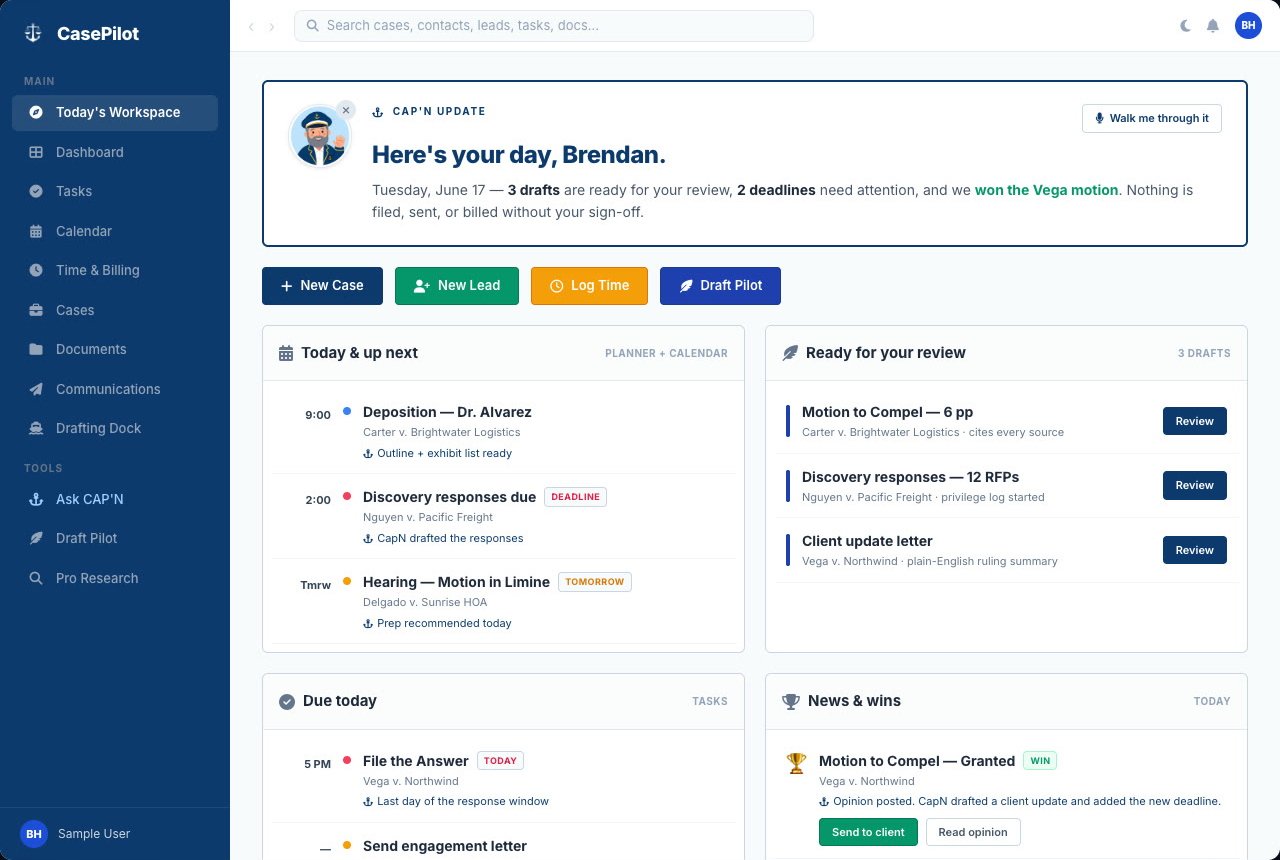
Open to Today's Workspace.

Every morning, CAP'N briefs your day: what's on the calendar, what's due, what's drafted and ready, and what just landed. Each item is one click from done. Nothing is filed, sent, or billed without you.

Live in-app demo · illustrative sample data

01 The Toolkit

The tools you reach for
every day.

Drafting, matter management, search, and CAP'N , kept simple and kept on your machine. All the overhead your firm runs on, with nothing to wire up.

Foundation · The matter boundary

One workspace.
One matter boundary.

Each matter has its own folder, its own permissions, and its own CAP'N scope, all on your machine. Documents stay on device. The cloud is for sync, not processing.

~/CasePilot/Johnson-v-Metro
Encrypted · local
Offline-capable

CAP'N does the drafting

Motions, briefs, and letters drafted from real case facts, not generic templates. Ready for your review, not a blank page.

Leads & matter management

Take a lead from intake to closeout. Notes, deadlines, and documents stay linked to the matter.

Document search

PDFs, Word docs, and scans, all searchable. Find the right paragraph in seconds, not folders.

Least-privilege access

Permissions scoped by case, folder, and role. Encryption and MFA come built in. No IT project required.

Connected workspace

Events, contacts, and notes carry their matter context with them. Nothing stranded in another app.

02 Onboarding

A short setup.
Then start working.

Three steps from download to running your first matter.

1

Install the app

Download the desktop app. Your matters, documents, and search run locally. No servers to wire up.

2

Set up your firm

Add users and roles, bring in your contacts, and organize leads and matters the way your firm already works.

3

Start practicing

Open a matter, draft with CAP'N, track deadlines, and pick a case back up where you left off.

0
Documents processed in a vendor cloud
1:1
CAP'N scope tied to a single matter
AES-256
Encryption at rest, on the machine you control
4+
CAP'N models: bring your own, or run local

“ Why we're building this

We built CAP'N to handle the busywork (drafting, scheduling, timekeeping, search) and kept the computation on the lawyer's machine. Convenient because it's bounded. Not in spite of it.
CP
CasePilot Team
Coming soon · macOS

03 Trust by architecture

Secure by architecture,
not by policy.

Most legal tech asks you to trust one massive shared cloud. We don't work that way. Your matters live where you can see them. Sync happens privately, between the devices you choose. Security isn't a policy page. It's where the work actually happens.

No massive shared database

We don't pool every firm's matters into one cloud. Your work lives where you can see it, not where a single breach takes down the industry.

Protected on the machine

Matters on your machine are protected with strong, modern encryption. Tampering doesn't go unnoticed. The app refuses to open anything that isn't intact.

Private sync between your devices

When your matters move between your devices, they move privately over an encrypted connection.

Backups without handing over the keys

Backups are encrypted on your machine before they're stored, and moving to a new Mac is a matter of bringing one file.

Enterprise-grade security at a solo-practitioner price.

$29 per user, per month. Bring your own AI keys. Encryption, private sync, and CAP'N come standard. No "enterprise tier" paywall on the things that matter.

04 CAP'N, up close

An AI captain that
actually does the work.

You set the heading. CAP'N handles the course within the permissions of the matter it's helping you on, never as a general assistant floating above the firm. Bring your own model credentials or run a local one. Either way, the busywork is handled.

Hello, counsel. What's our heading today?

Plain English is the whole UI

"Add 30 minutes to Smith." "Draft a subpoena in Johnson." "Remind me about the Jones deadline Friday." Open the command bar, type the sentence, and CAP'N turns it into a finished step inside the matter.

Takes action, not just suggestions

Other platforms hand you a recommendation and wait. CAP'N drafts the filing, opens the time entry, creates the calendar event, and surfaces each one for your sign-off. The work is done, not homework.

Scoped to one matter at a time

CAP'N can only see the files in the matter you're working on. It pulls facts, citations, and prior correspondence from inside the boundary, never the whole firm, never "just because it'd be convenient."

Your model. Your rules.

Plug CAP'N into OpenAI, Anthropic, or Google with your own keys, or run a local model when nothing is allowed to leave the machine. Switch providers any time. Credentials stay encrypted on your machine, and CAP'N can be toggled off entirely from Settings.

05 Autopilot for the rest

The day-to-day,
without the friction.

Calendars, contacts, intake, and matter timelines. All linked, all on your machine. CAP'N handles the small stuff in the background so you can focus on winning cases.

Calendar & deadlines

Court dates, filing deadlines, and meetings each carry the matter, lead, or contact they belong to.

Contacts & relationships

Clients, opposing counsel, judges, and witnesses, each with their role on the matter and a clear history of contact.

Lead intake

Capture leads, take intake notes, and turn qualified ones into matters without losing how the relationship started.

Matter timeline

Notes, documents, events, and CAP'N's finished work in one stream. Pick a case back up in seconds.

✦ One app, not five subscriptions

Replace the stack you're paying for.

Cloud LPM
Billing tool
Doc management
AI add-on
→
CasePilot
one local app

⚖ The honest comparison

Your cloud LPM vs CasePilot

Typical cloud LPMCasePilot
Where your data livesA vendor's shared cloudYour machine
Who can read itThe vendor (and whoever breaches them)Only you
A vendor breachYour client files, exposedNothing pooled to breach
If you leaveExport fights; financials held hostageWalk out with all of it
AIYour data transits their cloudLocal or BYO keys, matter-scoped

⇄ No lock-in

Walk in and out, freely.

Import your current data on day one. Export everything: matters, contacts, leads, time, and financials, any day after. It's your clients' data; you should never fight for it.

⬇ Import from your LPM ⬆ Export to CSV, any time
Coming soon · macOS

Let CAP'N handle
the small stuff.

CasePilot is coming soon on macOS. A local-first workspace where the matter boundary is real, and CAP'N drafts, schedules, and files the busywork so you can focus on what matters.